Feiyu Ricca 4K WiFi SONY IMX377 IP67 Waterproof Anti Shake Vlog Sport Digital Camera
Sony
артикул: 1543421
ЗГІДНО З НАШИМИ ДАНИМИ, ЦЕЙ ПРОДУКТ ЗАРАЗ НЕ ДОСТУПНИЙ
$254.99
Доставка з: Китай
Опис
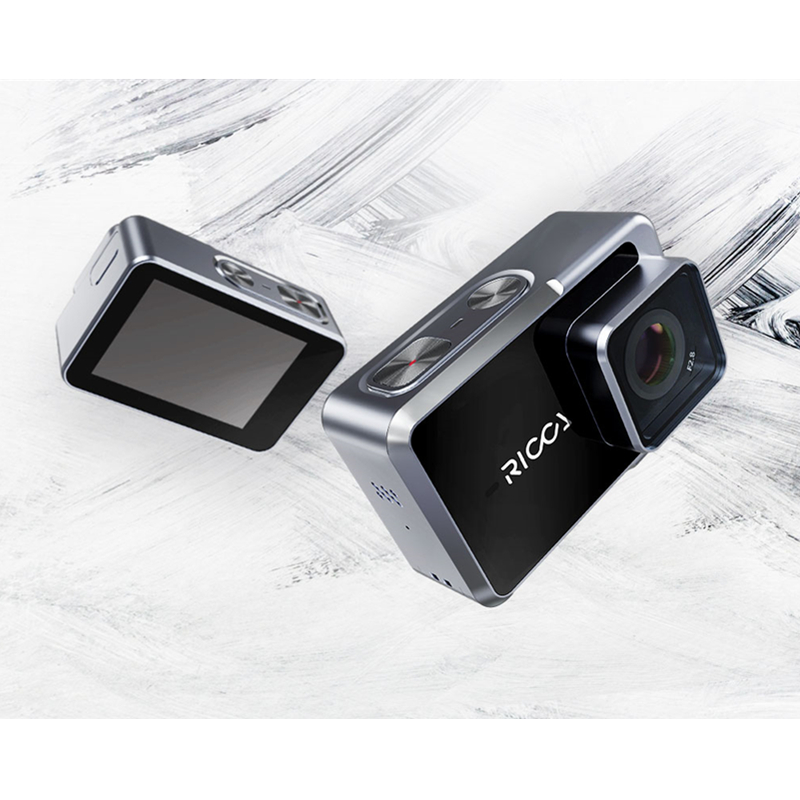
Lens F2.8 aperture / 155 wide-angle lens, 7G Display 2.35" 320480 resolution touch screen Main Processor and Image Sensor HiSilicon3559V100,SONY Image Sensor IMX377,1/2.3" 12 megapixels CMOS image sensor with Exmor R ability. IP Rating Waterproof: IP67, waterproof at depths of up to 1 meters in 30minutes, up to 40meters with waterproof case as optional accessory. Camera setup 4K 30fps, 2.7K 30fps, 1080P 30fps/60fps/120fps, 720P 60fps/120fps Photo Timed Photo Timelapse(Photo) Multiple Photos Video Video and Photo Timelapse(Video) Circle Recording Slow Motion Video Format JPG(Photo),RAW,MP4 Coded system H264, H265 Audio Double-Channel Microphone,built-in speaker Pixel 12MP/8MP/5MP Port Micro USB Battery capacity 1400mAH Lithium-ion It can be charged directly from USB port Working hours 2hours(External ambient temperature, humidity and recording content will affect the battery life Charging hours 2 hours Transmission and save the files WIFI 2.4Ghz Storage cards MicroSDHC, MicroSDXC 16GB - 128GB Storage card Operate Temperature 0~40 (14F-104F) Operate Humidity 15~90%RH Storage Temperature -20~60 (-4F-140F) Indicator Red/Blue/Green Color Grey Extended port inch thread hole Length*Width*Height 71.8mm*33.5mm*46mm 1. Electronic Image Stabilization Built-in 3 axis gyroscope and 3 axis accelerometer. Uses a cross-border compensation algorithm to compensate the motion change to produce stable video quality. Resolutions supported:All the resolution. 100% of the wide-angle lens distortion correction 2. Battery and working hours Charging Ricca with 5V/1A charger is suggested . The indicator next to RICCA logo flashes red while charging. The indicator keeps green when the battery is fully charged. Battery capacity: 1400mAH Lithium-ion It can be charged directly from USB port (DO NOT put in under the water while charging) Working hours: 2hours(External ambient temperature, humidity and recording content will affect the battery life Charging hours: 2 hours. 3. Button operations 1. Long press:Power on/Power off. 2. Single tap when it is off:Enter quick shooting mode, it will turn off itself after finishing the recording. 3. Single tap when it is on:Switch camera modes between photo multiple photo and video Camera button operations(red marked) 1. Single tap:Start/Stop recording 2. Long press:Turn on/off WiFi 4. WiFi operations 1 Turn on/off WiFi: Swipe down to quick setting interface, tap the symbol of WIFI to turn on the WIFI, Tap again to turn off the WIFI. Or you can tap the symbol at right corner to system setting, swipe down to WIFI setting and then turn it on /off. 2 Connect App: Turn on WiFi, and run Ricca APP, connect WIFI according to the info. of Ricca WIFI. 3 Control Ricca with APP: After connecting Ricca with APP, you can control the Ricca from APP to start/stop the recording, switch camera mode, change resolution and parameter, play back and monitor the footage in real time. 5. Ricca App functions Monitor the camera in real time, play back the video and photo, remote control the camera to start/stop the recording, switch camera mode, change resolution and parameter, show the battery level and remaining capacity of Micro SD card, switch between horizontal mode and vertical mode, edit the video online and share it on social media, reset the WIFI and upgrade the firmware. 6. Play back the video and photo Option 1: LCD Directly check the photos and play back the video on touch screen of Ricca. Option 2: App Ricca App monitor the footage of camera in real time, play back the video and photo. Option 3: Computer Connect via Micro USB to USB cable with Computer to check and play back the video and photo. Or copy files from MicroSD to computer. 7. Storage cards Storage standard: MicroSDHC, MicroSDXC 16GB - 128GB Storage card. Please use UHS-I Speed Class 3 (U3) storage card, it can provide High-speed and great performance. We recommend a MicroSD card below to ensure high-quality 4K video. 8. How to upgrade the firmware Option 1: Upgrade with MicroSD card Save the upgrade file at Root directory of MicroSD card on Computer, and then put MicroSD card in Ricca. Press the camera button and hold it, press the power button at the same time until the indicator next to Ricca logo turns green. The indicator flashes blue and green to give a hint that the upgrade is precessing. It takes about 2 minutes to finish the upgrade. The camera will auto-power on after the upgrade is done. Note for upgrade with SD card: * If the camera is latest version, it won't re-upgrade if you did the upgrade operations, only turn it on. * If there is upgrade file in SD card, please do the upgrade step by step, If do wrong operation to just turn it on, the upgrade file will be deleted automatically and then upgrade is cancelled, you have to copy the file again in SD card. * SD card format is requested as FAT32(right clickproperty),Or you have to format SD card and then copy the upgrade files. Option 2: Upgrade on APP(NOT Available yet) Package list: 1 X Ricca camera 1 X T type base 1 X Fixing part 1 X User manual and warranty card 1 X Hand strap 1 X Data cable 1 X Lithium-ion 1 X Curved fixing plate 1 X Flat fixing plate
Графік зміни ціни & курс обміну валют
Користувачі також переглядали

$15.32
Korean Sle Women's ort Suit Jaet V-Ne Single Button Design Sense Elegance Korean Sle Faion Workwear Coat
aliexpress.com
$45.02
5-Tier Storage Shelves, Garage Storage, Boltless Assembly, Adjustable Shelving Unit, 23.6 x 47.2 x 70.9 Inches
aliexpress.com
$3.02
12 шт., плетеные шарики в форме сердца, декоративные шарики из ротанга, подвесные шарики «сделай сам» для свадьбы, рождественской вечеринки (2,4 дюйма/6 см)
aliexpress.com
$9.58
Sandbag With Reflective Cloth Strip Thickened Canvas Children's Toys Primary School Students Small Sandbag Rice Husk Filling Int
aliexpress.com
$9.60
New Fashion Hip Hop T Shirt Men Women Cactus Jack ASTROWORLD Harajuku T-Shirts WISH YOU WERE HERE Letter Print Tees Tops
aliexpress.com
$116.02
Modern light luxury high-end art ornaments, high-end living room TV cabinet, entrance entrance, creative hotel home decoration
aliexpress.com
$26.06
Women Evening Bag Glitter Ladies Chain Shoulder Bags Luxury design Ladies Shiny Gold Female Wedding Party Clutches Handbag
aliexpress.com
$2.28
Men's Tshirt Fashion 3d Pitbull Dog Painted Casual T-shirt for Men Short Sleeve Tops 6xl Summer Casual Oversized Men Clothing
aliexpress.com
$8.40
Moissanite Stone Garnet Colour Pear Cut Lab Created Gemstone Advanced Jewelry Making Materials with GRA Certificate
aliexpress.com
$12.46
Мудлер для коктейлей, мудлер из нержавеющей стали Mojito, молоток лимона, розово-Черный Серебряный мудлер, палочки для ледяного удара, барные кухонные инструменты
aliexpress.ru
$13.11
Мужская обувь с высоким верхом на шнуровке, сетчатая Вулканизированная легкая амортизирующая обувь для баскетбола, Новинка осени 2023
aliexpress.ru
$62.43
Модель 2023 года, женская модная обувь на шпильке с пряжкой, модель DY4850 на весну и осень
aliexpress.ru
$9.47
Женские зимние джоггеры, спортивные брюки, флисовые утепленные прямые широкие брюки, женские винтажные однотонные повседневные мягкие брюки, уличная одежда
aliexpress.ru

$22.75
Outdoor Folding Envelope Sleeping Bag Camping Tent Sleeping Bag Mountaineering Camping Equipment Sleeping Bag Cotton Camping
aliexpress.com
$1.65
Shinobu Kocho Phone Case Fundas Shell Cover For Iphone 6 6s 7 8 Plus Xr X Xs 11 12 13 Mini Pro Max
aliexpress.com
$34.09
Современные подвесные потолочные светильники E27, светильник со стеклянными шарами, Луной для кухни, столовой, гостиной
aliexpress.ru
$5.84
Рождественские носки с изображением сэндвича Гордона Ramsay, индивидуальные носки унисекс для взрослых и подростков, Молодежные носки с цифровым принтом 360 °, подарок
aliexpress.ru
$6.20
Сменная роликовая пилка для ног для педикюра, средство для удаления огрубевшей кожи и мозолей
aliexpress.ru
$21.80
Для Toyota Highlander XU70 2021 2022 ABS автомобильные аксессуары для стайлинга передняя противотуманная фара накладка защитный чехол декоративная рамка
aliexpress.ru
$17.34
Модные наборы галстуков-бабочек карманные квадратные галстуки для мужчин галстуки-бабочки подарки для мужчин аксессуары 2019 деревянный галстук-бабочка
aliexpress.ru

$43.20
Geunine передняя внешняя дверная ручка, хромированный БЕСКЛЮЧЕВОЙ вход с кнопкой для kia Sorento 2015 2016 2017 2018
aliexpress.ru

$1,383.24
Душевой уголок Vegas-glass AFS-F LUX 120*100 05 CRYSTALVISION L, AFS-F LUX 120*100 05 CRYSTALVISION L
satra.ru


$6.09
Xmas Decorative Small Christmas Tree Sisal Silk Snow Tower Pine Blue Green Gold and Silver Red Mini Christmas Tree Ornaments
aliexpress.com


$21.78
Индивидуальный компьютерный механический коврик для клавиатуры Planet Universe Солнечная система коврик для мыши для компьютерного игрового снаряжения PUBG
aliexpress.ru

